I had been using Gnome-Do and found out that it was using all of the CPU!
So I looked up on the web and found a solution and it's very easy-
Open a terminal and type or copy-paste these commands.
1)sudo add-apt-repository ppa:do-core/ppa
2)sudo apt-get update
3)sudo apt-get upgrade
Friday, January 29, 2010

Thursday, January 21, 2010
Installing Gnome Activity Journal in just three commands No bzr No Compiling)
You might be aware of Gnome Activity Journal which is awesome.Here is the tutorial to get it installed in just three copy paste commands-
1)sudo add-apt-repository ppa:zeitgeist/ppa
2)sudo apt-get update
3)sudo apt-get install gnome-activity journal
Done.Now enjoy.
1)sudo add-apt-repository ppa:zeitgeist/ppa
2)sudo apt-get update
3)sudo apt-get install gnome-activity journal
Done.Now enjoy.
Tuesday, January 5, 2010
Become an Editor(Moderator) on my Blog(for Free)
Hello.Anyone who wants to become a moderator on my blog(for free).Apply for User and send me a email on ssj6akshat1234@gmail.com.
Qualities I am looking for-
1)Can Devote at least 1 hour for this Blog.
2)Must Know how to use ubuntu Properly.
3)Can Keep Us Informed on new software,news etc with sources or install procedure AND MUST GIVE CREDIT TO THE SITE HE HAS TAKEN INFORMATION FROM ALONG WITH THE LINK.
Qualities I am looking for-
1)Can Devote at least 1 hour for this Blog.
2)Must Know how to use ubuntu Properly.
3)Can Keep Us Informed on new software,news etc with sources or install procedure AND MUST GIVE CREDIT TO THE SITE HE HAS TAKEN INFORMATION FROM ALONG WITH THE LINK.
Saturday, January 2, 2010
OpenShot Needs you Help
For those who would like to see OpenShot in the Official Ubuntu Repositories go to this page and click "Affects Me Too". https://bugs.launchpad.net/ubuntu/+bug/441678
Note:You need to sign in to launchpad for this.
Note:You need to sign in to launchpad for this.
Tuesday, December 15, 2009
Metacity Compositing in Ubuntu 9.10
For Those who have problems with compiz (Super old GPU etc.) you can use Metacity's Compositing Feature(Doesn't give fancy effects but you can use use an App or Dock that requires compositing because it uses your CPU instead of GPU).
First Press Alt+F2.
Type gconf-editor
Click Edit ->Find
type compositing_manager and tick Search also in Key Names.
Click Find.
Click the item in lower window
tick the box in front of compositing_manager.
Enjoy.
Any Questions?Reply in Comments or send e-mail to ssj6akshat1234@gmail.com
First Press Alt+F2.
Type gconf-editor
Click Edit ->Find
type compositing_manager and tick Search also in Key Names.
Click Find.
Click the item in lower window
tick the box in front of compositing_manager.
Enjoy.
Any Questions?Reply in Comments or send e-mail to ssj6akshat1234@gmail.com
Monday, December 14, 2009
Windows 7 Like Superbar in Ubuntu 9.10
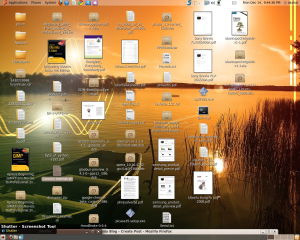
I have Made a Tutorial for those who like to see their GNOME Panel like the Windows 7 Superbar
Like This-
(Optional)Right Click the Panel and Click "Properties" then Click Background Tab.Click Solid Colour and set the Colour and transparency -

Note: The More Transparency you set the more the panel gets blended with your background
We will now need to add the dockbarX Gnome Panel Plugin
First add the dockbar-main PPA(Copy Paste Would Work)
sudo add-apt-repository ppa:dockbar-main/ppa
Then update your apt cache
sudo apt-get update
Then install dockbarX
sudo apt-get install dockbarx
Now Right click your panel and Click "Add to Panel"
Select the DockBarX Applet and click Add.
There you are done.You now have a Windows 7 like Superbar in Ubuntu(Though it won't show you the Live Preview).
If you want to Pin Items Click the three Parallel Lines and drag it as far as you want and Drag the icons of applications you want to pin to the Gnome Panel.
You can remove the old Window List by clicking the three parallel lines before it and clicking "Remove from Panel".
Comments are welcome(even bad ones).If you have any problems contact me at ssj6akshat1234@gmail.com
Like This-

(Optional)Right Click the Panel and Click "Properties" then Click Background Tab.Click Solid Colour and set the Colour and transparency -
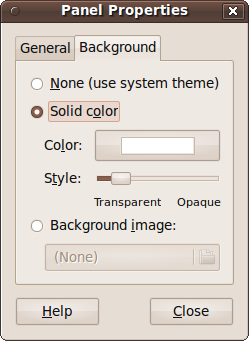
Note: The More Transparency you set the more the panel gets blended with your background
We will now need to add the dockbarX Gnome Panel Plugin
First add the dockbar-main PPA(Copy Paste Would Work)
sudo add-apt-repository ppa:dockbar-main/ppa
Then update your apt cache
sudo apt-get update
Then install dockbarX
sudo apt-get install dockbarx
Now Right click your panel and Click "Add to Panel"
Select the DockBarX Applet and click Add.
There you are done.You now have a Windows 7 like Superbar in Ubuntu(Though it won't show you the Live Preview).
If you want to Pin Items Click the three Parallel Lines and drag it as far as you want and Drag the icons of applications you want to pin to the Gnome Panel.
You can remove the old Window List by clicking the three parallel lines before it and clicking "Remove from Panel".
Comments are welcome(even bad ones).If you have any problems contact me at ssj6akshat1234@gmail.com
Subscribe to:
Posts (Atom)